Showing posts with label Gadget. Show all posts

Thursday, September 13, 2018

Apple iPhone XR First impressions

Apple is making a habit of launching “one more” iPhone every year. It did that with the iPhone X in 2017 and this year it’s the iPhone XR which fell into that category. What’s remarkable is that it’s very rare when the cheapest iPhone of the year catches the maximum attention. But that’s exactly what the iPhone XR has managed to do at the 2018 iPhone launch event. Even in the demo area of the Steve Jobs theatre, it attracted the maximum curiosity. Why? Read our first impressions to know:


Design

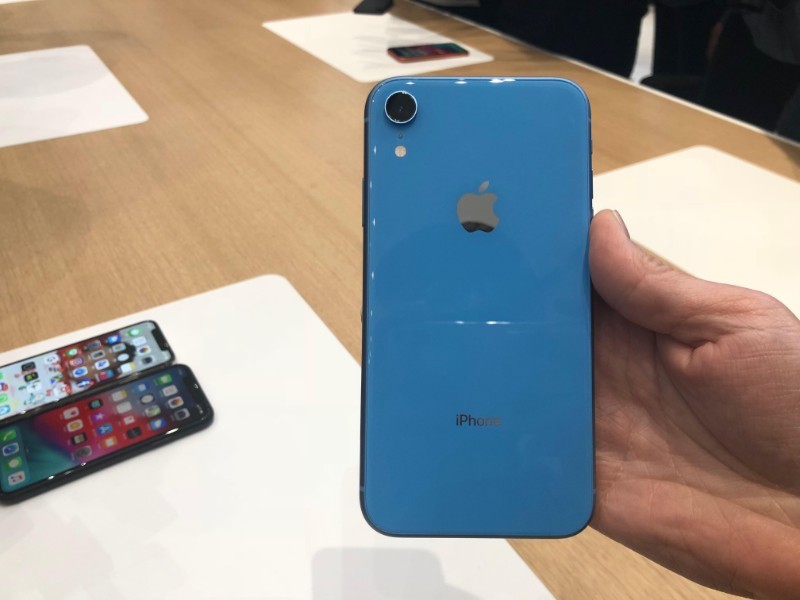
The first thing you’ll notice about the iPhone XR are the plethora of colour options it comes in. Apple has taken a bold step of moving away from its usual palette of colours with the iPhone XR. This phone comes in funky colours like Coral, White, Yellow, Black, Blue and even the Product Red. The Blue and Coral ones certainly stands out the most.

The iPhone XR has an all-screen glass and aluminum design which gives it a sturdy look and feel. The 6.1-inch screen is bigger than the iPhone X. The smartphone is easy to hold and offers a firm grip as well. The iPhone XR is splash and water resistant and comes with a rating of IP67. It retains the design appeal of the iPhone X but gets a nice dash of colour. The last time Apple went bold with colours was with the iPhone 5C. However, this is a more elegant design and the iPhone XR is one good looking smartphone.


Display

The one major difference between the iPhone XS and iPhone XR lies in the display. While the former has an OLED display, Apple has opted for an LCD display for the latter. If you’re thinking that there is a remarkable difference between the two, then yes there is. At least on paper. In reality, the LCD display on iPhone XR is really good. The images look sharp and colour reproduction is top notch. Apple seems to have done a fine job with the LCD display.


Camera and processor

The other difference in the iPhone XR and XS is the camera set up. The iPhone XR comes with a single camera at the back which we couldn’t test in detail. However, the Portraid mode and bokeh effect can be found in the iPhone XR as well. The images clicked on the iPhone XR we saw looked remarkably sharp and clear. Even the depth effect – a strong suit of dual rear cameras – was quite good. The front camera is a 7MP module. You’ll have to wait for our full review to know how the camera of iPhone XR measures against the rest.

As far as the processor is concerned, the iPhone XR is powered by the same A12 Bionic chipset. We fully expect this phone to deliver solid performance on all counts.


What we think

This might just be the best-selling iPhone of the year. Not because of its price alone but because this has all the good parts – well almost all – that the iPhone XS series has. And it costs considerably less, when compared to the iPhone XS. With a price tag of Rs 76,900, this could be the most compelling iPhone buy of the year. The LCD display is nothing to scoff at as it’s really good and it has the same processor as the expensive iPhones. However, it’s early to give a verdict on it but our hunch is that Apple might just have a winner on its hands with the iPhone XR.
Read More

Tuesday, March 8, 2016

Samsung Galaxy S7, Galaxy S7 Edge first impressions: Has the makings of a winner

Samsung Galaxy S7, Galaxy S7 Edge first impressions: Has the makings of a winner

Samsung had launched its latest flagship phones – the Samsung Galaxy S7 and the Samsung Galaxy S7 Edge at the Unpacked 2016 event at the Mobile World Congress in Barcelona. And now a few weeks later they have finally arrived in India.

Samsung’s pricing seems interesting keeping the competition in mind, does stand a chance at Rs 48,900 for the Galaxy S7 and Rs 56,900 for the Galaxy S7 edge. Oddly, both smartphones have been launched only in the 32GB variant, but this time around they do come with microSD card slots.

Post the event, we got a chance to try out both the Samsung Galaxy S7 smartphones. Here are our first impressions of the same. This first impressions was written after the Samsung Galaxy S7/S7 edge launch at MWC 2016. We have made the necessary changes with regards to the India launch in the article.


Build and Design
Samsung has not really done any major rework in terms of design philosophy on the Galaxy S7 smartphones and we quite like it that way. The new flagships come with IP68 certification, which lets you submerge both the smartphones for around 30 minutes under 1.5 mts of water. The other interesting design element that we noticed was that the camera module on the rear side is almost flush with the rear glass cover – which wasn’t the case with the Galaxy S6 series.

Samsung Galaxy S7 Edge 2

Samsung Galaxy S7 Edge

Both the phones feel good to hold in the hand, but their glass covers have the propensity to attract smudges, so much so that we had to constantly keep cleaning the glossy surfaces. The Galaxy S7 features a 5.1-inch display and measures around 7.9mm thick whereas the Galaxy S7 Edge with its 5.5-inch display is slimmer at 7.7mm thanks to the dual-edge curved display. The Galaxy S7 Edge weighs around 157 grams and the Galaxy S7 weighs around 152 grams.

On the left hand edge, you have the volume rocker buttons, the base has the 3.5mm audio jack, microUSB charging and data transfer port and the speaker grill section. On the right hand edge, you have the power standby button. whereas the top edge has the hybrid SIM card slot.

Samsung Galaxy S7 2
Samsung Galaxy S7

Display
The Samsung Galaxy S7 sports a 5.1-inch SuperAMOLED QuadHD display giving it a pixel density of 577ppi. The Samsung Galaxy S7 edge on the other hand sports a 5.5-inch SuperAMOLED QuadHD display which gives it a pixel density of 534ppi and of course has the dual-edge curved display as well. The displays looked quite sharp with vivid colours. As we have seen with most Samsung SuperAMOLED displays, there was a slight colour tinge noticeable when viewed from the sides.

Samsung Galaxy S7 7
Samsung Galaxy S7

Samsung has bundled both the phones with an Always-on display which lets you see the date and time along with all your notifications without having to unlock your device for the same.


Chipset, RAM, Storage and Connectivity
Samsung was very quiet about what chipset it is using inside the Galaxy S7 series, and it only mentioned that the new SoC had a CPU which was 30% faster than the Galaxy S6 series and a GPU which was 64% faster. But the SoC housed inside is the Qualcomm Snapdragon 820 chipset in international markets whereas the Indian versions will have Samsung’s own Exynos 8890 SoC with 4x Cortex A53 cores and 4x Exynos M1 cores.

Samsung Galaxy S7 Edge


Samsung Galaxy S7 Edge 13
Samsung Galaxy S7 Edge

This is paired with 4GB of RAM and there is 32GB of storage space. During the brief hands on time, we did not face any issues with the phone in terms of responsiveness. Considering Samsung had gone ahead with its own Exynos processors with the S6 series, it is interesting to see the new phone with a Snapdragon flagship chipset. So the main thing to look out for would be how well the phone manages the heat.

Also with the S7 series, Samsung has also added in a hybrid SIM card slot, so you can either put in a microSIM and Nano SIM or a nano SIM and a microSD card. According to the Samsung slide, it can support up to 128GB of SDXC storage in addition to the 32GB storage.

On the connectivity front, you get dual SIM configuration, Wi-fi 802.11ac, Bluetooth 4.2, NFC and so on. It also houses the heart rate sensor on the rear side just beside the camera.

Samsung Galaxy S7 Edge 8
Samsung Galaxy S7 Edge

OS and Software
Samsung Galaxy S7 series sports Android 6.0 Marshmallow along with the TouchWiz UI skin atop it. While the bloatware isn’t huge, you still find a lot of Samsung apps which you can do without. Samsung Pay has been pre-loaded as it is going to come to many new countries going forward. India did not get a mention as a partner country for the Samsung Pay rollout.

With the Samsung Galaxy S7 Edge, the Edge user interface now has two columns of apps which lets you quickly access more apps by just swiping from the side of the edges. We noticed that we had to swipe two or three times before the edge user interface reacted. Samsung has also let more developers use the edge user interface and we saw an example of Yahoo News app as part of the edge user interface feature.

Samsung Galaxy S7 Edge 12
Samsung Galaxy S7 Edge

For gamers, Samsung had an interesting announcement in the form of support for Vulkan API support. This basically helps the multiple cores take better advantage during gaming. We will need to play some high end games to see how well it performs and at the same time, how well it manages the heat while at it.


Camera
On the camera front, both the Galaxy S7 and the Galaxy S7 Edge come with a dual-pixel 12MP rear camera and a 5MP front-facing camera. Both the cameras sport a maximum aperture of f/1.7 which looks quite impressive on paper. Samsung has ensured that the rear camera is almost flush with the body. Samsung Galaxy S6 series cameras were the best we tested last year. With the dual-pixel AF technology and a 12MP sensor, will Samsung Galaxy S7 series cameras repeat the performance of its predecessors? We will have to wait till we can test the smartphone for ourselves.

Samsung Galaxy S7 Edge 5
Samsung Galaxy S7 Edge

Battery
Just like its predecessor flagships, the Samsung Galaxy S7 series does not come with a removable battery. The Galaxy S7 sports a 3000mAh battery whereas the Galaxy S7 Edge sports a 3600mAh battery. We will need to use the phone in the real world to see how long these phones are capable of lasting. Samsung also bundles in its power saving features within the TouchWiz UI and claims that its Always on display also bypasses the need to constantly wake up your device to check notifications. We will still wait a full verdict on that till we get the device to test out.

Conclusion

The flagship smartphones will be available for pre-order starting from 8 March till 17 March according to Samsung.

From our first impressions, at least on paper, Samsung looks like it is ready to do an encore of the Galaxy S6 series. It boasts of a better camera, better battery and a powerful chipset powering things under the hood. But as we had seen with a lot of flagship phones last year, the real life usage is a different beast altogether. Last year, Samsung got most things right and this year, it has added the IP68 certification to the Galaxy S7 series.

Samsung Galaxy S7
Samsung Galaxy S7

Going by past Samsung flagship launches, a price point closer to Rs 50,000 is not really that outlandish to believe. The phones sure have all the makings of a blockbuster, but real life usage is something that we can conclude upon only after a full review. Considering the Galaxy S6 series will most likely get a price drop, will the S6 series in a sense prove to be a competitor? Only time will tell.

Update: Now that the prices for the two phones are out, it is good to see Samsung pricing its S7 at Rs 48,900 and the S7 edge at Rs 56,900 when compared with the launch prices of the 32GB variants launch prices of the S6 and S6 edge (which did not come with dual SIM configuration or microSD card slots as well as water proofing chops) at Rs 49,900 and Rs 58,900 respectively. The only thing to see now would be how well the Samsung Exynos 8890 SoC holds up as it is an untested chipset.

Read More

Friday, June 27, 2014

Android L preview now available: A look at the big changes in the new OS


Google’s latest mobile OS iteration, known as Android L (for now, at least) is here. Though the company will roll out the software with its new devices – Android One or Android Silver – later this year, a developer preview of the OS is now available for the Nexus 5 and Nexus 7.

After a long time, Google has given the Android OS a major overhaul. The big changes are mainly visual and a part of what Google calls its Material design initiative. The new Material Design adds a geometric feel to the UI, offering refreshed look and animation. The system font has also been updated and Google says the experience of using L is akin to touching objects in real life, and how they interact with your touch.

It’s one of the biggest visual changes since Android 4.0, and you will notice almost everything looks new and different. The first big difference comes at the lock screen.

notificatons
Notifications

You can either expand swipe upwards to unlock the screen, expand a particular notification or simply swipe it way sidewards. This means you can see a message but there is no need to unlock your device to view it. You can also add some privacy and security settings, to safely access the information, and also have the option of not seeing the notifications on the lock screen. On the bottom are call, lock and camera icons for quick access.

Engadget points out, “Nearly every aspect of Android’s notifications has been blessed with improvements, and there are even a couple features that are entirely brand-new. Notifications can be viewed on the lock screen now – at least, the ones that you don’t mind others seeing if they happen to peek at your locked phone.”

Another noticeable change is that quick settings like Wi-Fi, Bluetooth, Airplane mode and others are now integrated within the notifications. So, don’t expect two separate windows. Initially, users won’t see it, but they will be accessible if you keep pulling the notifications bar further down or tap on it. This section also shows the bar to adjust brightness.

“We just barely saw a similar feature introduced in iOS 8 — if a message comes in, you can choose to reply or dismiss it right away, instead of having to go into the notifications menu or your default messaging app. (Indeed, there are a few differences between the two platforms’ implementations, but the general idea is very similar.),” adds the Engadget report.

Card-like recents
Card-like recents

On unlocking the device, you will notice that the homescreen hasn’t undergone too many changes. It still seems familiar as most of the icons are same except the settings icon which now shows a new design. DroidLife states, “On the main screen (read homescreen), we aren’t seeing anything new. It looks like the Google Now launcher. If you go in the widgets section, it still looks like KitKat to us. The wallpapers are still the KitKat style. Most app icons are same, baring (sic) the new settings icon.”

The Recents button still shows all the current running apps, however, they now appear like cards. Yes, looks like Google is all to extend the card-like Google Now UI to other parts of Android L. Just like before, you can choose the card to access or complete the function of that particular app or simply swipe it away to dismiss it. If you open a browser with multiple tabs and then you may see each tab in the form of the card. Well, that sounds too cluttered and for now, lets take it with a pinch of salt, as things are not final yet. Google may extend the functionality to multiple entries per app.

Another new offering is the redesigned keyboard that looks quite chic. Phandroid points out, “The keyboard is all new and improved. It still offers smooth swipes, a little search button and cool animation pop-ups. In advanced settings, it lets you change the colour schemes, allowing you to go back to the white option from ICS and blue from Kitkat. But not sure if we can switch back to these colours once the final cut is out.”

The all-new dialler
The all-new dialler

The phone dialler’s definitely new, adds the report. Once you tap on the dialler, you can pan through pages like Speed Dial, Recents and Contacts, and a small circular blue dialler icon moves with you. Tap on the icon, and you can start keying in the phone number. It also shows the search option right on top.

Another change comes to the sound alerts. Earlier you could either put the phone on silent or vibrating mode. It now also adds – Do not disturb. Do Not Disturb means you get the option to set the volume of notifications for a specific time period. You will also find a Do Not Disturb option in settings that lets you block messages or calls for sometime, or customise the blocking lists for specific contacts from your list.

That’s just digging the surface for now. A lot of the changes are in the back-end and will be unearthed by the development community in due time. For now, do let us know how your experience with the L preview has been.
Read More

eBay rejects auction of Nazi chief’s car


Auction website eBay has refused to list a World War II-era Mercedes Benz once owned Hermann Goering, a Nazi leader who commanded the German air force, citing a policy prohibiting the sale of offensive items.

The 1941 Mercedes Benz 540 K Cabriolet B, custom built by Daimler-Benz for Adolf Hitler’s close confidant, is currently in pieces in a high-end south Florida automobile shop, where owners said they plan to spend about $750,000 to restore it to working condition.

“We’ve located all the replacement parts and we can make parts,” said High Velocity Classics co-owner David Rathbun.

eBay, however, asked the owners to take down the auction after learning it would go live in early July.

“eBay has policies in place that prohibit the sale of offensive materials and content, which includes listings that promote or glorify hatred, violence or racial, sexual or religious intolerance,” spokesman Ryan Moore wrote in an email.

According to Rathbun, the car was seized by the U.S. Army’s 7th Infantry Division in Berchtesgaden, a town in the Bavarian Alps where Hitler built a sprawling residence.

After the war it became army surplus and was eventually sold by the head of a psychology institution in Heilbronn to Master Sergeant Sam Hosier, who drove it in occupied Germany. Hosier brought it to the United States and in 1955 sold it to a North Carolina man, who owned it until this year.

The owners would not say how much they paid for the car, only that they hope it will sell for $5 million to $7 million.

Another of Goering’s cars, a convertible Mercedes 540 K nicknamed the Blue Goose, was auctioned in 2011 in Italy by Ontario, Canada-based RM Auctions for about $2 million.

The owners lamented having to turn to traditional high-end auto sales auctions to sell the stretch coupe once work is finished.

“eBay is all over the world, it has hundreds of millions of users, and it was the biggest venue anyone could find,” Rathbun said.
Read More

Thursday, June 26, 2014

Google’s Cardboard DIY kit turns your smartphone into a virtual reality headset


Facebook spent billions to acquire Oculus VR and the technology behind Oculus Rift its virtual reality headset, but Google is taking a decidedly low-tech approach to achieving the same. This year’s I/O attendees got to pick either of the newly-launched Android Wear watches and were also given a mysterious kit simply called Cardboard.

As we expected, it’s anything but a simple piece of cardboard, like TechCrunch points out. It’s a DIY virtual reality headset kit that comes with all the MacGyveresque tools you will need to convert your regular smartphone into a virtual-reality display.

How to put Cardboard together (Credit: TechCrunch)
 
Using the instructions provided, you have to build the Cardboard into that familiar HUD shape, and also make sure all the other ‘high-tech’ tools such as the rubber band and a velcro flap are in the right place. There are two plastic lenses built into the face of the Cardboard, which add all the magic and wrap your phone’s display in the visible area.There’s also a piece of magnet that has to be attached to a small notch on the Cardboard’s exterior, and you’re set.

Since you are so up close to the image, it’s something like looking at an ultra wide, naturally curved display. The device, if we can call it that, works only when the Cardboard app on the phone is fired up. Navigation within the app is simply about moving your head to ‘look around corners’ etc. The magnet attached on the outside acts as a big selector and lets you pick elements within the UI.

At the moment, the selection of viewable content is limited to 7 categories. Users can watch a selection of YouTube videos using Cardboard, but many of the other applications are tied to Google Maps and Street View.

Tour Guide has you explore the Palace of Versailles in France, while ‘Street Vue’ lets you wander around in a VR version of street view in Paris. Earth Flyover lets you aerially explore a city in Google Earth, while there’s a Photo Sphere Viewer as well. Windy Day lets users explore a cartoony environment, from the point of view of a flying hat. ‘Exhibit’ allows you to examine more closely popular objets d’art.

Of course, this is just the work of Googlers during their ’20 percent’ time, so don’t expect a retail variant. However, if you want one, Dodocase is selling the kit online at the moment, with or without the NFC tag. It comes to around $20 without shipping, so it’s not that expensive.

Cardboard gif credit: TechCrunch
Read More

Android everywhere: Google’s dominant OS powers Android TV, Android Auto


It’s an Android world, at least that’s what Google is hoping it will be, as it showcased a redefined Android TV at its annual developer conference. Google also showcased Android Auto for cars as well during the keynote address. We take a quick look at what these are offering:

Android TV

Android TV isn’t something new. Google has been trying to get into users’ living rooms for some time now. Google TV was introduced way back in 2010 with the first Google TVs being made by Sony and Logitech. In the second generation of devices, LG, Asus and others had also partnered on Google TV. But Google TV wasn’t a success. Nor was the Nexus Q which was a media-streaming entertainment device introduced in June 2012. Q wasn’t much of success and it was replaced by Chromecast, which was showcased at last year’s Google I/O conference.

Android TV now lets users broadcast content to your TV, as well as search a grid of popular content, apps, and games. Voice search and Google Knowledge Graph are also enabled for Android TV, which means you can just talk to your TV and do a voice search for instant results.

Google has also made sure that there’s one Android software-development kit for all the company’s Android form factors and thus will allow apps to work across supported devices and platforms. According to the announcements at I/O, Sony and Sharp are producing Android-powered TVs and set-top boxes which will launch by 2015. Google also expects Asus, Razer to launch the first set of Android TVs by fall. The 2015 line of HD and 4K televisions from Sony, Sharp and TP Vision have Android TV.

Google’s Android L Developer Preview SDK includes the new Leanback support library that allows developers to design smoother, simpler, living room apps. Developers can “now build immersive native apps and console-style games on Android TV devices,” according to Google.

Dave Burke, director of engineering for Android, announces the Android TV during his keynote address at the Google I/O developers conference. Reuters

Dave Burke, director of engineering for Android, announces the Android TV during his keynote address at the Google I/O developers conference. Reuters

Where Chromecast is concerned, Google boasted that it is one of the top five selling electronic devices on Amazon and that is doing very well in countries like Australia, UK, USA. However Google didn’t give any numbers on how many Chromecast devices were sold across the world.

Chromecast now allows users to stream content from anywhere and you don’t even have to be on the same Wi-Fi network as the device. Do note that this an optional feature and users can make sure that not everyone can go around streaming content on their Tv sets via Chromecast.

There’s a feature called Backdrop which can run feeds of photos, news, weather, or art while you’re not using the Chromecast. Sort of like a screen saver for your TV. Except of course, this might mean of lot of electricity consumption and we’re not sure if this a good idea. There’s also a Cast Screen button which lets users directly mirror anything on their Android device to the TV. Of course you will need a supported phone or tablet from Samsung, HTC, LG, or the Nexus.

Android Auto: According to Google the idea behind Android Auto is to ensure that users aren’t switching between the phone and the steering wheel while driving. Like Android TV, users can just mirror their smartphone’s screen on the car’s screen.

Android Auto supports Google Maps which you can run via voice commands. You can also reply to messages you get on your phone with Voice. Users can play and find music on their cars without having to fiddle with the actual buttons. Google is also bringing some apps to Android Auto such as Songza, Pandora, and other radio and music streaming apps.

Google has also introduced Android Auto APIs, where app developers can ensure that an app designed for smartphones runs on Android Auto as well. The SDK for Android Auto will be introduced later. Google’s list of partners include Bentley, Ferrari, Audi, Ford, Nissan, Mazda, Suzuki, Skoda, Honda to name a few and they have a total of 40 partners. Whether Android Auto will also be a part of low-end models from these companies remains to be seen, but according to Google the first set of cars should be expected by end of this year.

Google Android Auto is the company’s answer to Apple’s CarPlay which also supports Siri-based contextual voice commands for making calls, sending and receiving messages.

Overall with Android Tv and Android Auto, Google is strengthening the Android platform and hoping to extend it in your living room and cars.
Read More

Google unveils Android L: And the L stands for…?


Finally, the next iteration of Android is here with a refreshing new look and some cool improvements. Google has introduced it as ‘L release’ without giving any specific name, and has kickstarted the guessing game for which dessert the search giant pick would pick next. The company will release the developer preview later today and will probably christen it when the first official devices running it finally arrive later this year.

The next version of Android is about to begin with L, and there are a lot of theories as to what the name could be. While lollipop, lemonhead and licorice seem to be a current crowd favourite globally, Indians are expecting it to be named after the desi sweet – Laddu or Ladoo. In fact, last year a group of students from IIT-Kharagpur – which also happens to be Pichai’s alma mater – have been lobbying for the next version of Android to be named Lassi.

HTC has quickly put out an image showing several options to consider from including lemon meringue, lady fingers, lava cake and even lemonade. There are some who also feel, the name is ‘L’ itself, while others think the company is buying time to fetch a sponsored brand. The Indian Twitrrerati is rooting for Ladoo, while some are ripping into the name, saying Ladoo’s updates would be called Motichur, Boondi, etc. Some others are busying joking around the L itself…as in L for Loser.

So what do you think? Will Google release a ‘sweet’ name or will L remain the final name? Let us know. We’d love to see more options.
Read More

Wednesday, June 25, 2014

Google Glass turning into a fashion accessory; DVF designer collection goes on sale


As promised, the DVF | Made for Glass collection is now up for grabs online. Earlier this year, Google had teamed with DVF, fashion designer Diane von Furstenberg’s studio for its newest range of Google Glass designs. The DVF collection adds five new frames to the Glass, which are up for sale via Google and online fashion retailer Net-a-Porter.

The five new shades and eight frames have been designed especially for women. The frames are available in five colours namely, brown, shiny lagoon, shiny elderberry, matte java and matte ice, and will cost $300 additional, which means the combination will cost $1,800. Meanwhile, the original Titanium Collecion frames are also available on MrPorter for $1650.

Looks like, Google is looking to add the fashion element to its Glass. DVF also took the Glass to New York Fashion week. Google has also partnered with Luxottica, which means Ray-Ban and Oakley-branded frames and shades for the Glass should eventually surface.

DVF shades now available

Moreover, seems Google also plans to take its Glass global, finally. It has already taken the first step by moving out of US, and headed to the UK. Google wants optometrists, sports lovers, online retailers, cooks and travellers to try out the Glass, and also looking forward to their feedback to improve the product. A grander commercial launch is expected sometime later this year.
Read More

Wednesday, June 18, 2014

Micromax Canvas Win W121: Is the budget Windows phone a step towards breaking Android dominance?


Micromax is going beyond Android and the company has launched its first set of Windows Phone 8 devices in India with Canvas Win W121 and the Canvas Win W092 at highly competitive prices. The 5-inch W121 is priced at Rs 9500, while the 4-inch W092 is priced Rs 6500 (Moto E competitor anyone?) and it’s evident that Micromax and Microsoft are trying to woo the budget user by launching a Windows Phone 8.1 device at these prices. The smartphones will be available in India from July.

In terms of specs, the Canvas Win W121 runs Windows Phone 8.1 OS has Qualcomm Snapdragon 200 processor with 1.2 GHz Quad Core CPU, 5-inch HD IPS display, 2000 mAh battery, 8MP rear camera with flash; 2MP front camera, 1 GB of RAM, 8 GB total memory space and microSD slot with 32 GB as the limit. This is a dual SIM device. It also has an in-built proximity sensor, gravity sensor or gyroscope, ambient light sensor and an accelerometer.

The Canvas Win W092 has a 1.2 GHz quad core CPU but a 4-inch IPS screen, 1500 mAh battery, a 5MP rear camera with flash and 0.3MP front camera. In terms of software, both phones are identical, so user experience should be more or less the same. Many users associate the Canvas brand with Android, and Windows Phone 8 would come as a surprise, but has Micromax done justice to the OS?

We got a chance to play with the Canvas Win W121 smartphone during the launch event and here’s our first impression of the smartphone.

Canvas Win W121 doesn't stand out in terms of design.
Canvas Win W121 doesn’t stand out in terms of design.

Design, Build and Screen

The Canvas Win W121 has a 5-inch HD screen with IPS and a leather-design back cover. Where design is concerned, the smartphone looks a lot like the other Canvas devices we’ve seen such as the Canvas Turbo. The only difference is that this one has a Home button, a Back Screen button and a Bing Search button since it is a Windows Phone device.

The leather back doesn’t really add a premium feel to the smartphone, and compared to Nokia devices in the same range such as the Lumia 630 (which is priced at a slightly higher Rs 11,500 but is retailing for closing to Rs 10,500) the Canvas Win W121 doesn’t offer any spark in term of looks. For Nokia’s Windows Phone 8 devices, coloured back-covers have helped the phones stand out, which is not the case here.

Hardware

In terms of specs, Micromax is making a pretty decent offer to users for Rs 10,000. The screen is a HD one, it has 1 GB of RAM, 8 GB storage space with 32 GB microSD slot. The processor is the Qualcomm Snapdragon 200 processor which is quad-core and clocked at 1.2 GHz. It also comes with an eight megapixel camera and LED flash, a 2 megapixel front camera.

The camera resolution is higher than the Lumia 630 which has a 5-megapixel camera, as is the screen size ( Lumia 630 has a 4.5-inch screen) and the smartphone offers more RAM. However the Lumia 630 has a Qualcomm Snapdragon 400 quad-core processor clocked at 1.2 GHz.

If specs is what you’re looking for the Micromax device is offering a lot more than the Lumia 630, at least on paper, and appears to be a solid Windows Phone option for under Rs 10,000.

Canvas Win does offer strong specs, atleast on paper.
Canvas Win does offer strong specs for its price point

Battery

The Micromax Canvas Win W121 has a 2000mAh battery but Micromax has not specified how long the standby time and the talktime is. Nokia devices stand out in the smartphone market for their superb battery performance. The Lumia 630 has a Li-Ion 1830 mAh battery with talk time of up to 16 h 20 min (2G) and 13 h 10 min (3G).

Will the Micromax device offer something as strong? That can only be determined once we’ve had some time to test the device more thoroughly, but there’s no doubt that if users do want to make a switch from a Micromax Android to a Micromax Windows Phone, they would surely want better battery life.

Micromax Canvas Win W121 has a leathered back.
The Canvas Win W121 has a leathered back.

Software

The good thing we have here is that both devices are running Windows Phone 8.1 without any bloatware. We did see Cortana, Microsoft’s answer to Siri and Google Now, on the Win W092 device, but couldn’t spot it in the Win W121 which is a little strange given that this is the more high-end device. Of course, it could be that the software build wasn’t final, which is likely to be the case.

The advantage with the Microsoft software is that users will get access to Office 365, which is great for a device that is priced under Rs 10,000. There’s also the Xbox app for games, Internet Explorer for browsing and of course the Windows Phone Store for access to apps. What users will miss here is the Nokia HERE maps, which is another strong feature of the Nokia devices, along with proprietary Nokia apps such as Smart Camera or the Lenses.

Where apps are concerned, Windows Phone 8 is starting to get all the apps, from Facebook to Instagram to Flipboard to Twitter. But again for those who are used to accessing these apps on a low-budget Android device, the experience on Windows Phone 8 is very different and not always very smooth.

For example, Facebook doesn’t have the full functionality you see in Android or iOS, and in my experience, the app is slow to load News Feed stories.

Microsoft Office is seen in the Canvas Win W121 smartphone.

Microsoft’s app market has been growing but when it comes to the new games such as Quiz Up, Dots, even Candy Crush Saga are not yet available on Windows Phone, which is surely a setback for potential buyers.

In conclusion, there’s no denying that Micromax has launched a Windows Phone 8 device at a very competitive price. Windows Phone 8 still has a long way to go where the app market is concerned, but it is catching up. Given that this is what most people use their smartphones for, Microsoft has to ensure more big name apps embrace the platform.

This is something Nokia phones avoid by offering something different in terms of software and hardware, especially when it comes to the Nokia MixRadio and the camera, so the Canvas Win W121 might not be the first option for many, despite its low price.
Read More

Saturday, June 14, 2014

Samsung Galaxy Tab S 10.5 vs Apple iPad Air: Tablet specs battle


Samsung has brought out its big guns with the new Galaxy Tab S line-up. This is perhaps the first time that we are seeing Samsung pack in everything its known for into a tablet line-up—from the ultra high-resolution Super AMOLED displays, to powerful octa-core processors to top-end graphics chips.

But the reigning tablet champion is the Apple iPad Air and it’s quite a tablet to beat, as we saw in our review. We absolutely love Apple tablet, but Samsung does have an attractive offering too. Before we can compare them head on, let’s take a look at the raw specs to see which one comes out on top on paper.

Apple iPad Air

The iPad Air is a barnstormer of a tablet. With its wafer-thin design, excellent ergonomics and a stunning display, there’s really no tablet better than it at the moment, in the 10-inch category. To be exact, the Air has a 9.7-inch display with a Retina-class resolution of 2048×1536 pixels and 264 pixels per inch.

Brilliant build
Brilliant build

The iPad Air is powered by the A7 processor, one of the fastest in the market. The 64-bit A7 64-bit system can handle data in bigger chunks than 32-bit processors. It’s also reputed to be one of best for power management.

Apple’s tablet has a 5-megapixel iSight camera, which is capable of recording HD videos at 1080p. Don’t expect iPad cameras to be like their iPhone counterparts. The front has an HD FaceTime camera. And the battery is rated for 10 hours of usage, something we can confirm is more or less on the money.

Samsung Galaxy Tab S 10.5

Samsung announced two sizes in the new Galaxy Tab S series and both are aimed squarely at the iPads, although in typical Samsung fashion, they have larger displays. Samsung’s 10.5-inch tablet comes with a WQXGA (2560×1600, 16:10) Super AMOLED display, that’s just a little higher in resolution than the iPad Air. Samsung has it beaten in terms of pixel density too with 288 PPI. The Samsung Galaxy Tab 10.5 Wi-Fi weighs 465 g (467 g for the LTE version), while the iPad Air is about the same at 469g. At 6.6 mm, Samsung’s tablet is also thinner than the iPad Air (which is 7.5 mm thick).

Samsung's new tablets
Samsung’s new tablets

LTE variant of the tablet packs a Snapdragon 800 chipset with a 2.3GHz quad-core Krait 400 CPU, while the Wi-Fi version offers Samsung’s Exynos 5 Octa chipset with a quad 1.3GHz Cortex-A7 and quad 1.9GHz Cortex-A15. Both come with 3GB of RAM and with either 16GB or 32GB of internal storage, with a microSD card slot. The Tab S has a 8MP camera with LED flash, capable of recording 1080p video, while the front camera is a 2.1MP snapper. Despite the slim waistline, battery in the 10.5-inch tablet is a generous 7,900mAh Li-Ion unit. Samsung has not specified a rated battery life.

Here is the breakdown of the specs:

The specs battle
The specs battle

On the face of it, the Tab S wins with higher specs, but the iPad Air is a proven tablet with a superb hardware-software integration, while Samsung’s version of Android might not to be everyone’s liking. The iPad Air is also more compact, which could work in its favour, but Samsung has managed to keep the size of its larger tablet under control as well.

We’re itching to see how Samsung’s latest will compete with the iPad on an everyday basis, but in terms of pure specs, the Korean company has a slight advantage.
Read More

Friday, June 13, 2014

Samsung Galaxy Tab S first impressions: Finally, a Samsung tablet that can rival the iPad


It’s easy to see why Samsung made a big hoopla about their new Tab S launch, now that we’ve seen them. This is no run of the mill Tab refresh that Samsung ritually performs year after year. The Tab S is Samsung’s way of telling the Android competition why they are the one to beat. With a tighter control of the hardware and software than ever before, the Tab S is at long last, a Samsung tablet that can actually go toe to toe with Apple’s offering.

Both the 8.4-inch and 10.5-inch tablet sport 2560x1600 pixel resolution screens
Both the 8.4-inch and 10.5-inch tablet sport 2560×1600 pixel resolution screens

Samsung had the iPad Air and mini with Retina clearly in its crosshairs when designing the Tab S series. The display is the talking point of the new tabs and when compared to Apple’s Retina displays side by side, the colours are noticeably richer and punchier. Black levels are as inky you’ll ever get and the new display modes like adaptive display, prevents colours from looking oversaturated, which is an easy trap to fall in when it comes to Super AMOLED displays.

Samsung has designed flip cover accessories

The 8.4 and 10.5 models are pretty much identical spec for spec except for the battery size of course. They are both lighter and thinner than Apple’s offerings. As far as premium feel goes, we will say that they are an upgrade from their existing Tab series but it’s really hard to make plastic feel anything close to actual aluminium. The Tab S is lighter but you sacrifice the feel of cold metal for plastic.

Perforated plastic back, like the Galaxy S5

The perforated back is intentionally designed to look like an S5 since both devices are flagships in their own right. The two circular buttons are just that, physical push buttons which make attaching the smart cover a lot easier without adding bulk. The Tab S is not waterproof like the S5 however, it does inherit the fingerprint scanner. Both tablets have IR blasters and the same 8MP rear camera and 2.2MP front facing.

Thinner than both the iPads

One of the biggest additions is the new software features like SideSync 3.0 and Remote PC. The former is similar to Apple’s Continuity and Handodd, except that instead of just reciving calls through the tablet, SideSync actually creates a virtual image of your S5 on the Tab S and lets you use all the functions as if you were physically using the phone. Both devices connect over Wi-Fi Direct which allows you to transfer files as well with good speed. This also comes in handy in MultiWindow mode.

The 8.4-inch variant has a very real chance of dethroning the iPad mini

The UI is surprisingly quick and fluid. In fact, it wouldn’t be a stretch to say this is the fastest we’ve seen TouchWiz on any Galaxy device. The Magazine UX interface is similar to the Tab Pro and Note Pro but tweaked a bit.

Samsung has tweaked the Magazine UX slightly for the new tabs

The aggressive pricing from Samsung is what got everyone in the audience really excited. The Tab 10.5 and Tab 8.4 start at $499 and $399, for the 16GB, Wi-Fi only models. Sound familiar? Samsung is ruthlessly going after Apple’s turf by offering a better spec’d tablet with a similar look and feel (thinner and lighter in fact) for the same price. Not only that, Samsung is throwing in a whole bunch of freebies by signing up exclusive partnerships with folks like Marvel, Conde Nast, Netflix and many others. Samsung is not leaving any stone unturned as it’s covering its bases very well in terms of content for consumption.

Here’s a short video hands-on with the Galaxy Tab S 8.4:


The Tab S series is quite something. It’s nothing like Samsung’s previous or current offerings which is why this gets its own special launch event. Our only fear is, can Samsung commit to the Tab S in terms of regular updates and bug fixes? We’re confident that the Tab S is convincing enough to sway prospective iPad buyers. However, in doing so, you’re also inadvertently buying to Samsung’s own little ecosystem. In order for some of the biggest features like SideSync 3.0 to work, you’ll need a high-end phone like the S5 or at least a relatively high-end Samsung device (we’re presuming at this point).

Could away some potential iPad buyers
Could sway potential iPad buyers

The Tab S will hit stores in the US come July, with just the Wi-Fi models available initially followed by the LTE variants. Stay tuned for our full review of the new Tab S, which will be coming soon.
Read More

Thursday, June 12, 2014

Samsung IP shows a tablet which can be folded, to be released early 2015

Just a day after we heard of Nokia’s demo of two foldable displays, a report has come out stating that Samsung may allegedly launch a foldable tablet by early 2015.

The Korean report builds up on the screen shots of a Samsung IP which showcases a smartphone with a tri-fold flexible display. Samsung is allegedly working on an 8 to 9-inch tablet which can be folded in twice, reaching a form factor which resembles a smartphone. From the picture, the device looks bulky when folded. It is not clear if the device will have three separate displays that work together when unfolded.

Samsung's IP shows a foldable tablet design
Samsung’s IP shows a foldable tablet design

Nothing is confirmed naturally, but there are rumours that a prototype of such a device is already in existence. Samsung is allegedly looking at an early 2015 release.

There are still concerns regarding how Android will work with the foldable display in both folded and unfolded orientations. Samsung will most likely have to custom build some apps from the ground up if it indeed has three separate displays, to make use of the folding design.

Samsung is not new to the curved or flexible display space. It has already released the Galaxy Round, its curved phone and is heavily invested in Curved OLED TVs. Samsung has also showed off its Youm flexible display and in the past we have heard of its flexible display production plans as well. Whether this tri-fold tablet will indeed be a reality, only time will tell.
Read More

Saturday, June 7, 2014

Apple smartwatch all set for October launch


Apple is preparing to sell its first wearable device this October, aiming to produce 3 million to 5 million smartwatches a month in its initial run, the Nikkei reported on Friday, citing an unidentified parts supplier and sources familiar with the matter.

Specifications are still being finalized, but the devices are likely to sport curved OLED (organic light-emitting diode) displays and sensors that collect health data from blood glucose and calorie consumption to sleep activity, the Japanese news service cited industry sources as saying.

The industry has long expected Apple to unveil some sort of smartwatch, following the release of Samsung Electronics’ Galaxy Gear watches.

Wall Street is hoping to see a new Apple product this year to galvanize the former stock market darling’s share price and end a years-long drought of ground-breaking devices. CEO Tim Cook has promised “new product categories” in 2014.
Read More

Friday, June 6, 2014

Samsung Z’s Tizen UI caught in action: Samsung rips off own TouchWiz for new OS

Earlier in the week we had reported the Samsung Z going official and becoming the first Tizen device on the market. It’s expected to come to other countries later this year after an initial launch in Russia.

Samsung’s Tizen-based Samsung Z boasts a 4.8-inch HD (720p) Super AMOLED display, which sounds to us to be the same one used in the Galaxy S3. The smartphone comes with 2.3 GHz quad-core processor, though we will hear more about the graphics side of things at the event soon. But the one thing we don’t know much about is how the Tizen UI looks and functions.

We finally have a video of a Samsung Z prototype being demoed by thehandheldblog.com. The UI shown is very different as compared to the other Android powered Samsung phones. The smartphone supports multiple home screens making it easier to navigate through the phone without the need of tapping on to specific icons for certain commands. See the full video to know more.


The pull-down notification is nothing new as it has previously been seen on almost all of Samsung’s Android powered smartphones. Also like Android, you can make multiple changes not only to the UI but also to the way you unlock your phone. The smartphone hosts a list of 8 applications which are default or system apps and are available out-of-the-box. Samsung has retained some of the apps like S-health that they have earlier provided for their mid-range and high-end smartphones.

Samsung has retained some of the older functions like the long press of the home button for multi-tasking or opening the system monitor. The web browser is quite basic looking allowing you to save pages and access bookmarks, home page, speed dial and history quickly. The contact UI is more or less the same as the Samsung’s Android-powered phones. As for the UI of the camera and the music player, this too remains very similar to the Samsung Galaxy S5 which features image recognition in the gallery and music sorting functions.

The Samsung Z hosts an 8MP camera on the back, and a 2.1MP front camera which also feature many presets seen in Samsung’s Android phones such as Mini mode, Quick shot, Best Photo, Drama Shot and Panorama mode. The smartphone sports 2GB RAM with an internal memory of 16GB which is expandable up to 64GB through the microSD slot.

It is safe to say that for practiced Samsung users, the Tizen platform will not present a high learning curve on the Samsung Z.
Read More

Twitter considers buying SoundCloud post Spotify, Pandora talks


Twitter has been in talks with Berlin-based online music platform SoundCloud in its efforts to add a music service to its offering, the Financial Times reported citing people familiar with the matter.

The microblogging site has weighed up deals worth billions of dollars and has also considered buying music-streaming service Spotify and Internet-radio provider Pandora Media, the newspaper said citing the people.

SoundCloud is an audio platform that enables people to upload, record, promote and share their music.

The company has aggressively expanded its capabilities to carry multimedia content. Last year, itacquired ’We Are Hunted,’ a three person music streaming-startup from Australia.

Twitter’s renewed interest in music-streaming companies comes after Apple acquired Beats, the headphones and music-streaming firm founded by Jimmy Iovine and Dr. Dre, for $3 billion.

The Beats deal was seen as Apple’s effort to jump-start an uneven attempt to make headway in music streaming, the fastest-growing segment of the market, as iTunes sales decline.

Pandora Media and Spotify have raced ahead while Apple’s eight-month-old iTunes Radio has not made much of a dent.

Twitter and SoundCloud could not be immediately reached for comment outside regular U.S. business hours.
Read More

Wednesday, June 4, 2014

Scientists use Nokia Lumia 1020 to capture images of bacteria


Nokia Lumia 1020 houses an excellent camera within as we had seen when we reviewed it. We have seen countless ways in which Nokia Lumia 1020 has been used to promote itself, be it this Red Bull advert or the 50 Lumia setup which created this video. But last month, the Lumia 1020 was used by two researchers to photograph and identify a type of bacteria.

In a scientific paper published in a Histopathology (examination of body tissue to study diseases) journal, authors Dr Mark Li-cheng Wu and Dr John Paul Graff described how they employed a Nokia Lumia 1020′s camera to identify a type of bacteria. Both the doctors are experts in the field of photomicrography. In the interview given to Nokia blog, the scientists explained how they connected the Lumia 1020 to a state of the art microscope and used the 1020′s lossless zoom function to get more detail out of what was seen through the microscope.

The image of the bacteria shot through a microscope using Nokia Lumia 1020

Apart from better image quality, Dr Graff said, “One of the big advantages you also have using a Microsoft-based operating system in hospitals (at least here in America), is that most of the computer networks, wherever you go, are Microsoft Windows based. The Lumia interplays with everything very smoothly so you can send files to OneDrive or secured shared drives quickly.”

The Lumia 1020 has been used by the scientists for the last 10 months and he claims that the speed offered by the 1020 in terms of image capture, saving and sending as opposed to a traditional set up where you have to go through a proprietary software is what makes using the 1020 more convenient.

Apart from higher resolution, according to the scientists, Nokia’s optical image stabilisation came in quite handy. It allowed them to shoot handheld through the barrel of the microscope’s ocular. This speeded things up as compared to a fixed set up.

The scientists also made some suggestions such as increasing the battery life, improving the capture rate and making provisions for a microSD card slot to store the high resolution images.
Read More

Apple pulls slightly ahead of Google in the iOS vs Android battle


Apple is calling the iOS 8 the biggest release since the launch of the App Store and it does give users plenty of new features and developers the tools to create amazing new apps. But what does this mean for Android and Google? How do the two biggest competitors in the mobile OS market stack up against each other? How does this latest release change the game?

Apple CEO Tim Cook took some serious potshots at Android during the keynote address. When talking about users who switched from Android to iOS, he said: ”They had bought an Android phone, by mistake, and then sought a better experience. And a better life. And decided to check out iPhone and iOS.” He also pointed out how Android was the place where malware ruled.

Tim Cook’s jibes aside, an iOS 8 vs Android assessment is necessary and important, given that they are the biggest mobile players in the world. We’re looking at these comparison points in particular: Messages, Camera, Online Cloud Storage, Continuity, HomeKit and HealthKit app. The reason we’ve included HomeKit and HealthKit app is because these areas are going to experience massive growth in the mobile sector and there’s no way that Google hasn’t started working on these.

Messages: Apple has given iMessage a serious upgrade. Users can now name message threads, exit or enter a thread as they wish. There’s also a Do Not Disturb option to a group chat without having to leave it. Audio and video messages can be shared on Group chats and regular iMessaging. They also have a Snapchat-like self-destruct function that users can opt out of too.

Also SMSes, can be synced across Apple devices from Macs to iPads. iMessage now feels like a combination of WhatsApp, Snapchat and regular messaging.

No wonder that Jan Koum, WhatsApp’s CEO was unhappy and tweeted saying, “very flattering to see Apple “borrow” numerous WhatsApp features into iMessage in iOS 8 #innovation”

So how does Android’s SMS app compare to iMessage?

Google had merged Hangouts and the SMS app which meant that users could search across contacts, including Google accounts. All SMS and MMS messages come in this one place.

Of course, users who might be on devices such as Nexus 4 which had a native SMS app might not choose to merge the two given the privacy issues that plague Google.

Hangouts, of course, allows users to have groups chats, share videos, etc, but this SMS-Hangout marriage is an Android KitKat feature. Since only 9 percent users are on this build of Android, most people are still stuck on the boring SMS app.

Add to that the fragmented manufacturing scene that Android faces, users get different SMS apps in different devices. Unless it’s a pure Android phone.

In the short-term, Apple’s iMessage is winning purely because if you have an iPhone 4S and above — you have all access to all the features. In Android, getting the latest feature in SMS, depends on what build of smartphone you’re using.

Camera: In iOS 8, shooting and editing photos will definitely get better. Users can now take a picture, then modify it with a single touch. The new camera app will let users adjusts exposure, brightness, contrast, and more.

In fact as you make the changes to photo’s colour scheme, the smartphone will show how the levels are changing in real time. Interestingly third-party app developers can make their filters and editing tools also accessible in the Photos app directly.

There’s also a Time-lapse mode in Camera. Basically it can help users capture the sun setting, etc. iOS 8 will take the photos at selected intervals and stitch it together as video.

In Android, the Camera app in KitKat also offers features similar to iOS 8. Users can instantly edit pictures will filters, change exposure, contrast, crop a picture. Of course, unlike iOS 8, Android doesn’t allow third-party apps to provide their filters, but again the native Camera apps are pretty evenly matched.

Of course, OEMs tend to add their own modes to the camera app and thus Android has an advantage here that Apple doesn’t always offer.

HealthKit app: Let’s face it Google is far behind Apple in this area. There are APIs on Health from Google but no dedicated health app like Healthkit. Of course Google could announce its own native app for this at the upcoming Google I/O later this month (25-26 June) but for now Apple has the lead.

With the HealthKit app, Apple has pulled ahead of Android.

The HealthKit app can pull in data from other third-party apps and this can be accessed by healthcare professionals as well of course depending on how much access users give to this app.

Apple partnered with the world-renowned Mayo Clinic on this. With HealthKit, the iPhone will keep a tab on important health metrics on a daily basis, and over a longer period.

iOS 8's double swipe will also show your most used contacts as well. Image: Tech2.
iOS 8′s double swipe will also show your most used contacts as well. Image: Tech2.

After Mayo Clinic, Nike is also partnering with Apple for HealthKit. Apple promises that the data on Health will have deep privacy protection in place to store these sensitive records safely.

Of course, Samsung is one Android manufacturer that has been taking the Health-Smartphone link seriously. The S5 comes with a heart-rate sensor, an improved S-Health app, but given that its not available on other Androids, it’s pretty much an S5 and Samsung feature.

HomeKit: Google might have bought Nest first but Apple showed that it leads in the smart home game by announcing HomeKit. Essentially Apple is hoping that users will trust their iPhones and sync it with other home products.

Users can connect their iPhone/iPad and control garage-door openers, lights, and security cameras, even thermostats and switches.

Users can just control these through Siri. For example, they could say “Get ready for bed” and the house lights will dim. Of course. you’ll need products that are certified for the HomeKit.


For Android, catching up to the competition will be tough. As this Mashable piece points out, “Google will have a tough time convincing consumers that Android will safeguard their privacy and security as well as iOS might (the stat that Tim Cook cited, that 99% of mobile malware targets Android, happens to be true).”

Cloud capability: Even with the new iCloud Drive, Apple is still playing catch with Google. Google Drive already lets you edit documents from inside and share links on Gmail via Google Drive.

iCloud Drive offers similar features to users and now allows them to arrange documents, photos by tags, folders etc. Apple will also let you share large files as well which is something that Google was already offering. Where iCloud Drive is concerned, this is nothing new and doesn’t really set iOS 8 apart from Android.

Also users can search for iCloud documents directly from the Spotlight bar, which means that you don’t actually have to save documents on the iPad or iPhone. Google Drive doesn’t yet offer this feature, where you can search directly for Google Drive docs from the Search bar on the Homepage.

Continuity: Continuity is where Apple’s advantage of being a hardware and software manufacturer is showcased. Documents from OS X can open seamlessly on iOS and vice-versa. You can also take calls from your iPhone on your MacBook or iPad or iMac.

To be fair, Motorola and Samsung have offered features similar to this. Also, Gmail lets users access the email via draft with its real-time saving capability. Google also offers browsing and tab sync via its Chrome browser extensions, features which are similar to Continuity.

The problem though for Google is that it doesn’t occupy an important part of the Desktop space or even the PC space and thus such syncing is only available at an account level on Google.

Apple has come very close to the idea of ‘one OS, one account but multiple devices’ with Continuity.

It’s clear that despite Google’s dominance in the smartphone market, Apple has more than just a few tricks up it’s sleeve. It has also shown that it isn’t shy of taking the battle to the next level. iOS 8 allows Apple users to bring their devices together in a seamless manner — something that Android will be looking to do as well. The battle has been joined — just how will Google respond?
Read More

Google teams up with DVF for designer Glass frames


Google has now teamed with DVF, fashion designer Diane von Furstenberg’s studio for its newest range of Google Glass designs. The all-new ‘DVF | Made for Glass collection’ will bring five new frames to the Glass, which will be up for sale via Google and online fashion retailer Net-a-Porter starting June 23 . According to TheVerge, a new frame designed by DVF along with Glass and prescriptive lenses will cost $1,725. On the other hand, Furstenberg’s sunglasses plus Glass are priced at $1,620.

In its official Google+ post, the company writes, “Today we’re announcing the DVF | Made for Glass collection, a collaboration that brings chic eyewear designs by iconic American fashion designer Diane von Furstenberg to the Glass Explorer Program. These new designs build on the style choices we gave Explorers when we launched the Titanium Collection in January.”

While the tech behind the Google Glass has been lauded by tech enthusiasts, the design hasn’t been widely accepted. Many believe that the existing design could make you look ‘silly’ in crowd. The new frames are aimed at solving this issue, as the design brings more stylish and regular glasses-like look.

After being available for a limited time in the US, Google later launched the device for everyone in the US. Google wants optometrists, sports lovers, online retailers, cooks and travellers to try out the Glass, and also looking forward to their feedback to improve the product. As of now the product is still in the beta stage, and a commercial launch is expected later this year.
Read More

Six features Apple borrowed from Android and others for iOS 8


iOS 8, the operating system to power its next generation iPhone. It is quite obvious that people have started pitting it against its arch-rival Android. The most common and widely voiced criticism it has received is ripping off features from Android and other services. WhatsApp has already slammed the Cupertino company for ‘borrowing’ its messaging features. We’ve listed six such features that Apple has borrowed from Google’s Android and other services.


iCloud Drive


Google takes a ‘step ahead’ with iCloud that earlier worked only with select files and has now launched iCloud Drive. However, it appears to be nothing different than Dropbox, or even Google Drive, for that matter. Moreover, using iCloud iWork integration, it now allows users to switch between devices and resume work from where they had left, and also access it across all devices using iCloud Drive. Sounds familiar? Obviously yes, this is also something we’ve already seen with Google Drive and Docs.

Apple will also let you share huge files and other documents using iCloud Drive via emails. We’ve seen Google implement this feature within Gmail by using Google Drive as a source and destination for attachments.

vv
New iCloud Drive… really?


Third-party keyboards


While Apple seems to be moving ahead by including support for third-party keyboards such as Swype and SwiftKey, but if this is the future, then Android users have been living in it since the very beginning. Needless to say, Android has been supporting third-party keyboard apps, and Google included the swipe-typing feature in the default keyboard with Android 4.2 Jelly Bean update as a part of its Project Butter, two years ago.


Siri


Among other rip-offs, this one really stood out. Apple now wants you to activate its voice assistant by simply saying ‘Hey Siri’. It’s not exactly ‘OK Google’ but it’s not all that different either.

iMessage


Looks like, Apple wants to take on WhatsApp, at least for iOS. Apple has also borrowed some features from the popular messaging app that was recently acquired by Facebook. It has included the audio messaging, group chat and sharing location features, which are already available on WhatsApp and also on WeChat, Line and others. You can also exit group chats and re-enter them when you wish. Again, this is just like WhatsApp.

What’s more, Apple has also been inspired by Snapchat, and iMessage now auto-deletes video or voice messages, if you set it to.


In-app sharing


With the iOS 8 iteration, Apple has included extensibility and sharing ability that allows apps to interact with one another. Well, great inclusion for iOS users. However, Android has been offering inter-app sharing with ease, thanks to the Intents system. Android users can easily share information from one app with another. For example, you can click a photograph, edit it using G+ Photos and then share it through any third-party app that lets you share. With extensibility, Apple app developers can add new functions within app for a similar experience.

Additionally, Apple is also opening up the filters API to third-party photo apps. As cool as it may sound, Microsoft already has this feature on Windows Phone, called ‘Lenses’.

a
Continuity and Handoff


Widgets


Widgets are a common feature when it comes to Android devices. Apple also brings support for widgets with its new OS. However, the distinguishing factor is – Android widgets can be placed anywhere on its homescreen while Apple widgets are said to be a part of its notification centre. In addition, these are not traditional widgets, in that they show you glanceable information only when it’s available, and they aren’t ever-present.


Continuity and Handoff


Apple has introduced enhanced compatibility between desktop and mobile platform in the form of Continuity. The feature is also very crucial to OS X Yosemite. A feature called Handoff, lets you work on multiple devices provided they are signed into the same iCloud account and are in the same network. You can use Handoff with apps such as Mail, Safari, Pages, Numbers, Keynote, Maps, Messages, Reminders, Calendar, and Contacts. Developers can build Handoff into their apps now, too. Continuity also lets you answer iPhone calls on your Mac, or even continue iPad messages on Mac.

While it sounds innovative, it isn’t for the first time that we’ve seen these features. Gmail also lets you access the email via draft with its real-time saving capability. Google also offers browsing and tab sync via its Chrome browser extensions. The ability to receive or make calls from a computer using Continuity feature isn’t something novel either. Good old Viber has been doing it for some time now.

While there are many influences in iOS 8, it should be noted that Apple will be bringing native support for these features, negating the need for extensions, add-ons and apps. And this could result in a lot of apps becoming redundant.
Read More

About Us

I, Bimal K. Chawla, Working in Android technology as Associate Software Engineer in Mohali, Punjab, India. I likes to play and watch cricket, to Walk...Read More

Blogroll

Advertisment

About